Loquora: Real-time voice translation for multilingual conversations
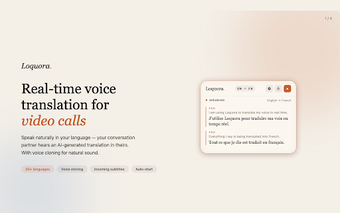
Loquora, developed by Loquora, is an AI-powered real-time translation extension for Chrome that helps speakers converse across languages in live calls. It translates spoken speech during browser meetings and presents translated audio alongside on-screen captions to aid comprehension. The tool pairs a browser extension with an optional desktop app for broader audio routing. International professionals, remote teams, and language learners gain faster conversational access across language barriers. No account setup is required for basic browser use.
What can Loquora do during a multilingual call?
Loquora provides live voice-to-voice translation with AI voice-cloning that preserves key vocal characteristics when rendering speech in another language. The extension offers automatic language detection so participants can switch languages without manual intervention, and it shows live translated subtitles on screen. Supported languages include English, Spanish, French, Chinese, and additional global languages, which helps meetings read more like ordinary conversation than a patchwork of isolated translations.
How well does Loquora integrate with browser call platforms and system audio?
The Chrome extension connects directly to WebRTC platforms such as Google Meet and Discord to perform translation inside the browser. For native apps and non-browser calls, a dedicated desktop application for Windows and macOS provides system-wide audio routing so Zoom or messaging apps can carry translated output. The developer describes the experience as close to zero-latency in back-and-forth exchanges, keeping conversational timing suitable for meetings and language practice.
Who benefits most and what trade-offs should they expect?
Loquora targets international business professionals, remote teams, and language learners who need on-the-fly conversational translation while preserving speaker identity. The free plan typically limits roughly 30 minutes of real-time translation per month, which constrains casual use for longer sessions. Users requiring full native-app coverage must install the desktop client, an extra step before system-wide integration with non-browser tools.
Loquora is a practical tool for live, voice-preserving translation with an install trade-off
Loquora suits professionals and learners who need conversational translation that keeps speaker identity intact and minimizes interruptions. Expect a trade-off: system-wide translation requires installing the desktop application, and the free plan limits monthly live minutes. For teams willing to add the client to reach native apps, the app delivers a usable way to hold live, voice-preserving multilingual conversations with minimal workflow disruption.